Udaress
Udaress
Udaress
MVP Redesign
MVP Redesign
MVP Redesign
01. OVERVIEW
Task
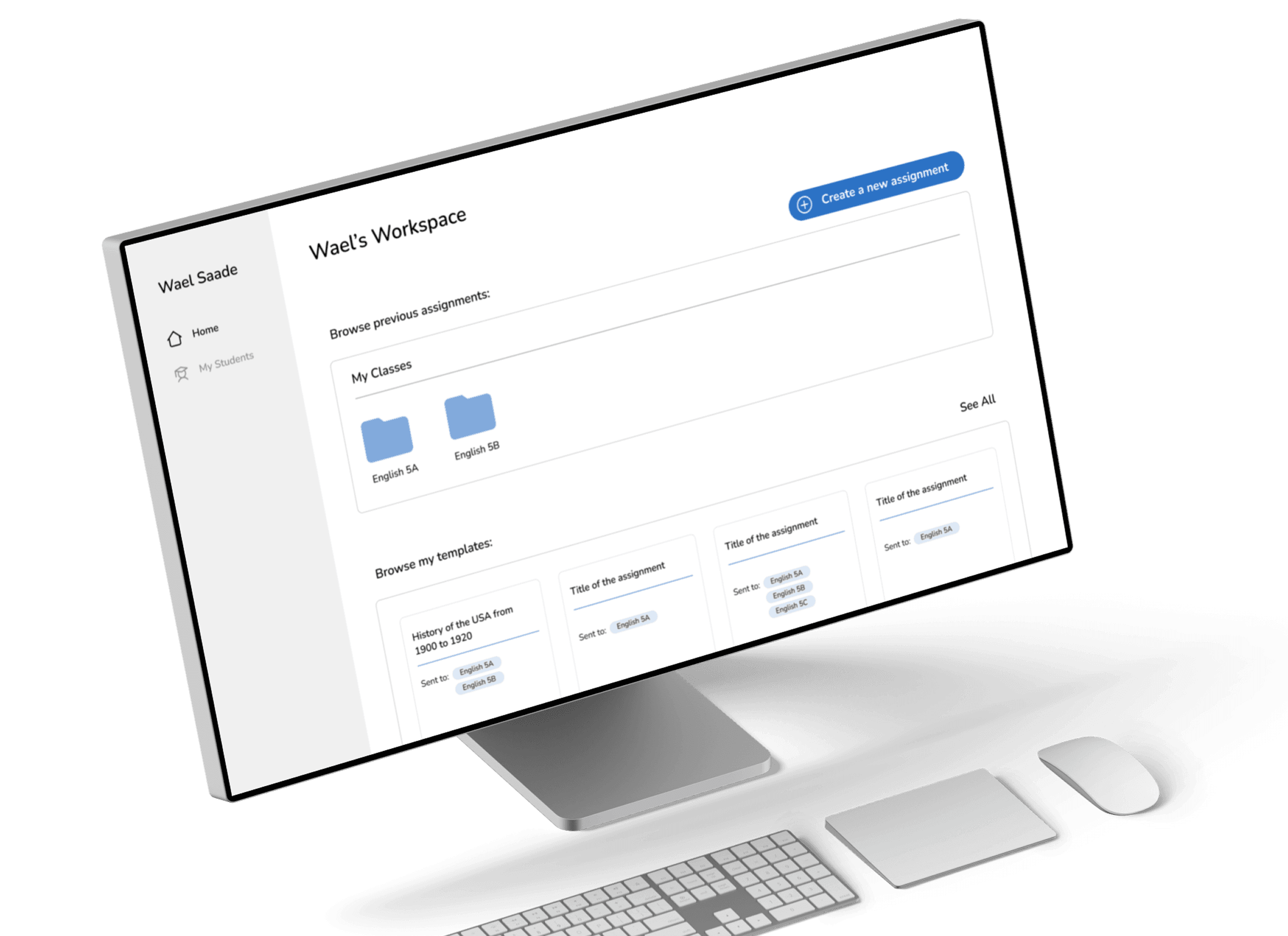
Redesigning the MVP
Redesigning the MVP
Team
Individual
Individual
Timeframe
2 weeks
2 weeks
Tools
Figma, Figjam, Zoom, Slack, Useberry, Adobe Photoshop, Adobe Illustrator
Figma, Figjam, Zoom, Slack, Useberry, Adobe Photoshop, Adobe Illustrator
02. OBJECTIVE
Udaress had an early beta version of their MVP, tested with a small group of users. However, as the startup grew, they needed a more refined MVP that reflected their recent business pivots and incorporated valuable user feedback. They reached out to me to redesign the MVP, ensuring it aligned with their evolving needs and current stage of growth.
03. SCOPE
The scope of the redesign focused on improving the platform’s functionality and user experience while introducing new pages. After a call with the stakeholders, we identified which pages needed a redesign and which required designing from scratch.
Existing elements that needed redesigning
Existing elements that needed redesigning
Existing elements that needed redesigning
"Create New Assignment" flow
Teacher homepage
Teacher dashboard
Elements to be designed from scratch
Elements to be designed from scratch
Elements to be designed from scratch
Notifications page
My Students page
Admin page
04. RESEARCH AND STAKEHOLDER INSIGHTS
As always, research was the starting point for the project. I conducted an in-depth competitor analysis, exploring their products, understanding how they functioned, and highlighting the main differentiators of each.
The stakeholder meeting also highlighted a significant shift in the tool’s purpose—from being primarily a quiz tool to evolving into a teaching assistant, with quizzes as an optional feature.
As always, research was the starting point for the project. I conducted an in-depth competitor analysis, exploring their products, understanding how they functioned, and highlighting the main differentiators of each.
The stakeholder meeting also highlighted a significant shift in the tool’s purpose—from being primarily a quiz tool to evolving into a teaching assistant, with quizzes as an optional feature.
As always, research was the starting point for the project. I conducted an in-depth competitor analysis, exploring their products, understanding how they functioned, and highlighting the main differentiators of each.
The stakeholder meeting also highlighted a significant shift in the tool’s purpose—from being primarily a quiz tool to evolving into a teaching assistant, with quizzes as an optional feature.
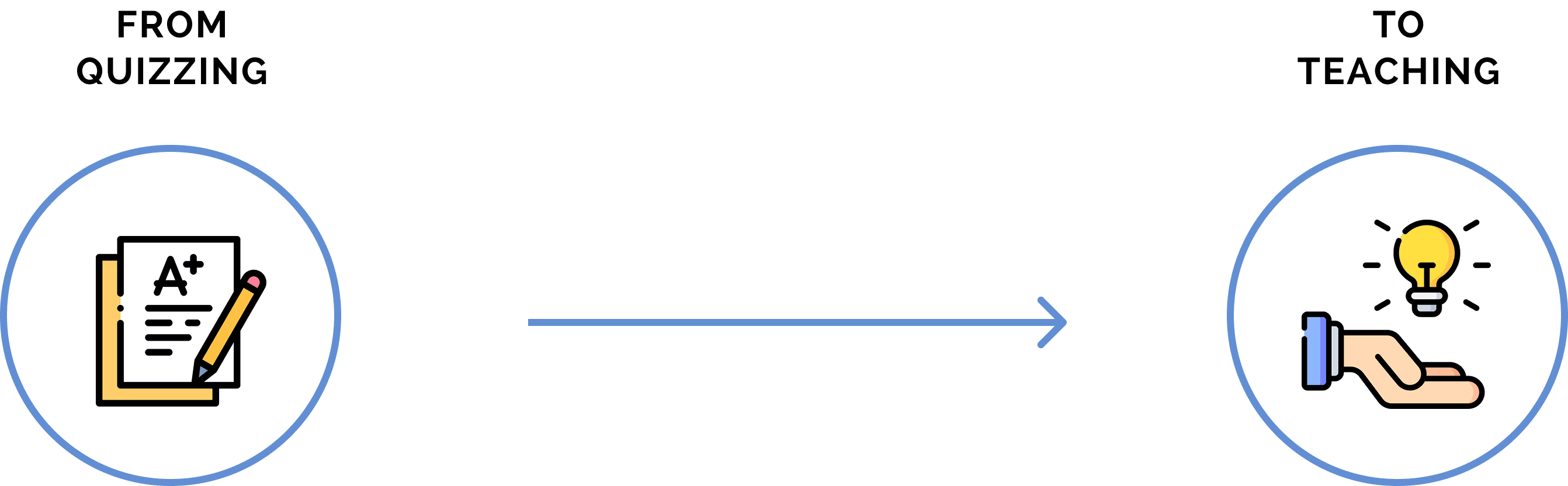
The core pain point for teachers was not just graded assessment but ensuring that every student truly understood the material—a challenge amplified by the high student-teacher ratio. No two students learn at the same pace, making it essential for AI to adapt the delivery of information based on individual needs. Instead of focusing on grading, the AI would evaluate student comprehension and adjust the teaching approach accordingly—eliminating the pressure of grades while fostering a more personalized learning experience.
The core pain point for teachers was not just graded assessment but ensuring that every student truly understood the material—a challenge amplified by the high student-teacher ratio. No two students learn at the same pace, making it essential for AI to adapt the delivery of information based on individual needs. Instead of focusing on grading, the AI would evaluate student comprehension and adjust the teaching approach accordingly—eliminating the pressure of grades while fostering a more personalized learning experience.
The core pain point for teachers was not just graded assessment but ensuring that every student truly understood the material—a challenge amplified by the high student-teacher ratio. No two students learn at the same pace, making it essential for AI to adapt the delivery of information based on individual needs. Instead of focusing on grading, the AI would evaluate student comprehension and adjust the teaching approach accordingly—eliminating the pressure of grades while fostering a more personalized learning experience.

05. UNDERSTANDING THE EXISTING STRUCTURE
(A QUIZ TOOL)
(A QUIZ TOOL)
(A QUIZ TOOL)
Before the redesign, the “Create New Assignment” process was structured as follows:
Before the redesign, the “Create New Assignment” process was structured as follows:
Before the redesign, the “Create New Assignment” process was structured as follows:
Teachers type the subject they want to quiz their students on.
They select a prompt from one of the three assignment types Udaress provides:
Chat Assignment
Activity Assignment (Role-play with AI)
Normal Assignment (Q&A format)
They review and edit the AI-generated prompt if needed.
They revise and adjust the grading rubric if necessary.
They select the level of hints the AI can provide to students, ranging from 1 to 5.
They attach a PDF or document, if needed, to ensure the quiz content aligns with specific materials.
Finally, they send the quiz to students.

While functional, this process placed the emphasis on quiz creation rather than fostering understanding. Additionally, user interviews revealed that teachers found the assignment types confusing and often weren’t sure which one to choose. Another major issue was that linking a PDF to guide the quiz appeared too late in the process, making it feel misplaced.
While functional, this process placed the emphasis on quiz creation rather than fostering understanding. Additionally, user interviews revealed that teachers found the assignment types confusing and often weren’t sure which one to choose. Another major issue was that linking a PDF to guide the quiz appeared too late in the process, making it feel misplaced.
While functional, this process placed the emphasis on quiz creation rather than fostering understanding. Additionally, user interviews revealed that teachers found the assignment types confusing and often weren’t sure which one to choose. Another major issue was that linking a PDF to guide the quiz appeared too late in the process, making it feel misplaced.
I realized that for Udaress to function as a true teaching assistant, I needed to rethink the experience from the ground up.
I realized that for Udaress to function as a true teaching assistant, I needed to rethink the experience from the ground up.
I realized that for Udaress to function as a true teaching assistant, I needed to rethink the experience from the ground up.
Watch video demo of the old “Create New Assignment” flow
Watch video demo of the old “Create New Assignment” flow
Watch video demo of the old “Create New Assignment” flow
06. REIMAGINING THE STRUCTURE:
(FROM QUIZ TOOL TO TEACHING ASSISTANT)
(FROM QUIZ TOOL TO TEACHING ASSISTANT)
(FROM QUIZ TOOL TO TEACHING ASSISTANT)

Since the design process required a fresh perspective, I had to approach it with fresh eyes, avoiding the constraints of the previous structure. While the color scheme and font were to remain the same, everything else needed reconsideration.
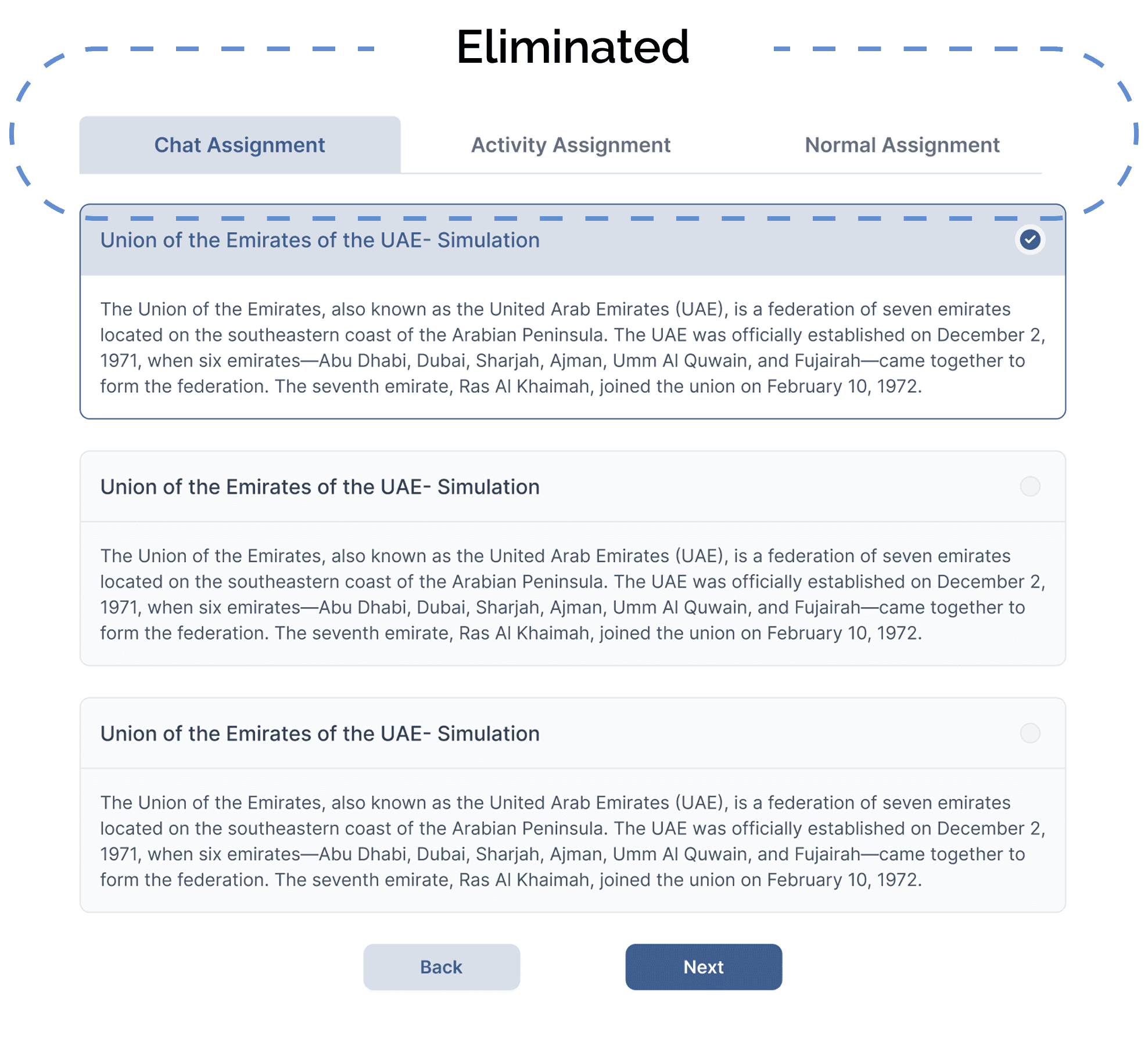
The first step was to define the building blocks of any lesson. Teachers typically base their lessons on one of the below:
Since the design process required a fresh perspective, I had to approach it with fresh eyes, avoiding the constraints of the previous structure. While the color scheme and font were to remain the same, everything else needed reconsideration.
The first step was to define the building blocks of any lesson. Teachers typically base their lessons on one of the below:
Since the design process required a fresh perspective, I had to approach it with fresh eyes, avoiding the constraints of the previous structure. While the color scheme and font were to remain the same, everything else needed reconsideration.
The first step was to define the building blocks of any lesson. Teachers typically base their lessons on one of the below:

A subject from the curriculum they follow
A subject from the curriculum they follow
A subject from the curriculum they follow

A link to an online article
A link to an online article
A link to an online article

A YouTube video explaining a specific topic
A YouTube video explaining a specific topic
A YouTube video explaining a specific topic

A PDF or document they have on their computer
A PDF or document they have on their computer
A PDF or document they have on their computer
Since these resources form the foundation of a lesson, I realized that the assignment creation process should begin with selecting one of these options. This shift allowed the AI to tailor the learning experience around the chosen material, transforming Udaress from a simple quiz generator into an adaptive teaching assistant.
Since these resources form the foundation of a lesson, I realized that the assignment creation process should begin with selecting one of these options. This shift allowed the AI to tailor the learning experience around the chosen material, transforming Udaress from a simple quiz generator into an adaptive teaching assistant.
Since these resources form the foundation of a lesson, I realized that the assignment creation process should begin with selecting one of these options. This shift allowed the AI to tailor the learning experience around the chosen material, transforming Udaress from a simple quiz generator into an adaptive teaching assistant.
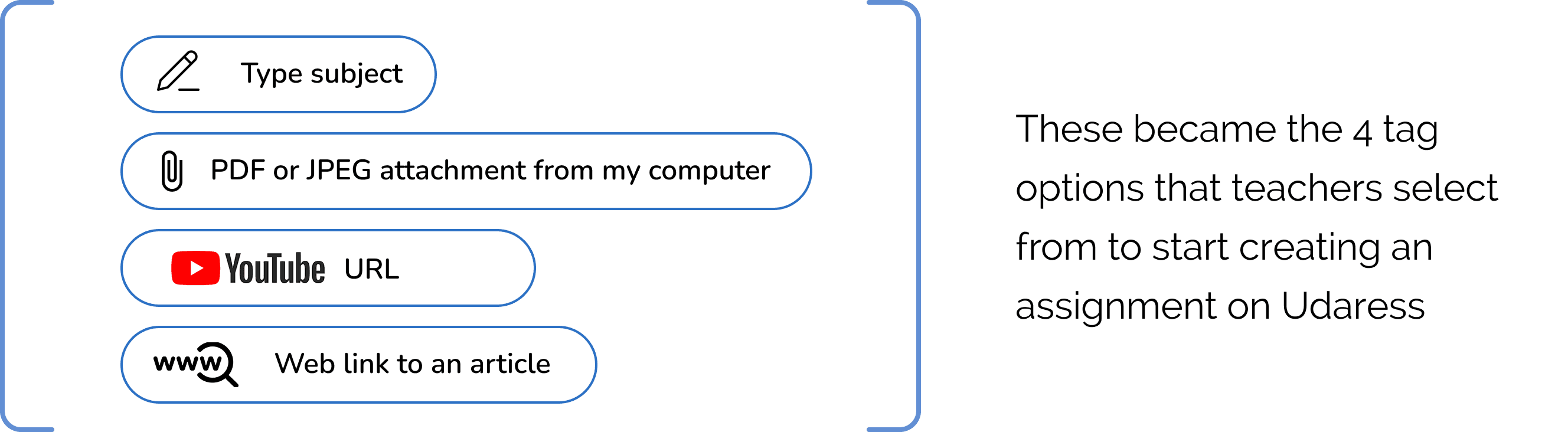
Additionally, I eliminated the three assignment types—Chat Assignment, Activity Assignment, and Normal Q&A Assignment—since they were all essentially variations of a chat-based interaction between the AI and the student. Removing these categories simplified the process and made it more intuitive for teachers. The fewer steps a teacher has to consider, the better the experience.
Additionally, I eliminated the three assignment types—Chat Assignment, Activity Assignment, and Normal Q&A Assignment—since they were all essentially variations of a chat-based interaction between the AI and the student. Removing these categories simplified the process and made it more intuitive for teachers. The fewer steps a teacher has to consider, the better the experience.
Additionally, I eliminated the three assignment types—Chat Assignment, Activity Assignment, and Normal Q&A Assignment—since they were all essentially variations of a chat-based interaction between the AI and the student. Removing these categories simplified the process and made it more intuitive for teachers. The fewer steps a teacher has to consider, the better the experience.
07. THE NEW FLOW
To make assignment creation more user-friendly and engaging, I redesigned the flow into a chat-based conversation between the tool and the teacher. This conversational approach ensures ease of use, guiding teachers step by step in a smooth and seamless manner. I also incorporated a vertical progress bar displaying steps 1 to 4, allowing teachers to see their current step and how many remain.
Here’s how the redesigned flow works:
To make assignment creation more user-friendly and engaging, I redesigned the flow into a chat-based conversation between the tool and the teacher. This conversational approach ensures ease of use, guiding teachers step by step in a smooth and seamless manner. I also incorporated a vertical progress bar displaying steps 1 to 4, allowing teachers to see their current step and how many remain.
Here’s how the redesigned flow works:
To make assignment creation more user-friendly and engaging, I redesigned the flow into a chat-based conversation between the tool and the teacher. This conversational approach ensures ease of use, guiding teachers step by step in a smooth and seamless manner. I also incorporated a vertical progress bar displaying steps 1 to 4, allowing teachers to see their current step and how many remain.
Here’s how the redesigned flow works:
1- Subject Selection:
Teachers begin by selecting the subject for the assignment in one of four ways:
Typing the subject manually
Attaching a relevant PDF file
Pasting a URL to a YouTube video
Pasting a URL to an online article
2- Assignment Format:
For each assignment, teachers have the flexibility to between:
Multiple choice
Discussion Q&A
Real-life application
Progressively harder questions
Show their work process
Or allow the AI to decide the best format based on the material provided
3- Assignment Objective:
The AI suggests assignment objectives based on the entered subject or attached file. Teachers can:
Select one or more suggested objectives
Add, edit, or delete objectives as needed
Toggle between Teaching Mode and Quiz Mode
If Quiz Mode is selected, the objectives are assigned weights to guide the AI’s evaluation. Teachers can customize these, ensuring they total 100%.
The AI suggests assignment objectives based on the entered subject or attached file. Teachers can:
Select one or more suggested objectives
Add, edit, or delete objectives as needed
Toggle between Teaching Mode and Quiz Mode
If Quiz Mode is selected, the objectives are assigned weights to guide the AI’s evaluation. Teachers can customize these, ensuring they total 100%.
The AI suggests assignment objectives based on the entered subject or attached file. Teachers can:
Select one or more suggested objectives
Add, edit, or delete objectives as needed
Toggle between Teaching Mode and Quiz Mode
If Quiz Mode is selected, the objectives are assigned weights to guide the AI’s evaluation. Teachers can customize these, ensuring they total 100%.
4- Send Assignment:
Once the assignment is ready, the teacher selects the class(es) and sends it to students. They also have the option to preview the assignment before sending.

This streamlined approach reduces decision fatigue, ensures teachers focus on content rather than structure, and aligns with the AI’s goal of personalized learning.
This streamlined approach reduces decision fatigue, ensures teachers focus on content rather than structure, and aligns with the AI’s goal of personalized learning.
This streamlined approach reduces decision fatigue, ensures teachers focus on content rather than structure, and aligns with the AI’s goal of personalized learning.
08. REDESIGNING THE TEACHER DASHBOARD AND STUDENT INSIGHTS
1. Organizing Assignments by Class
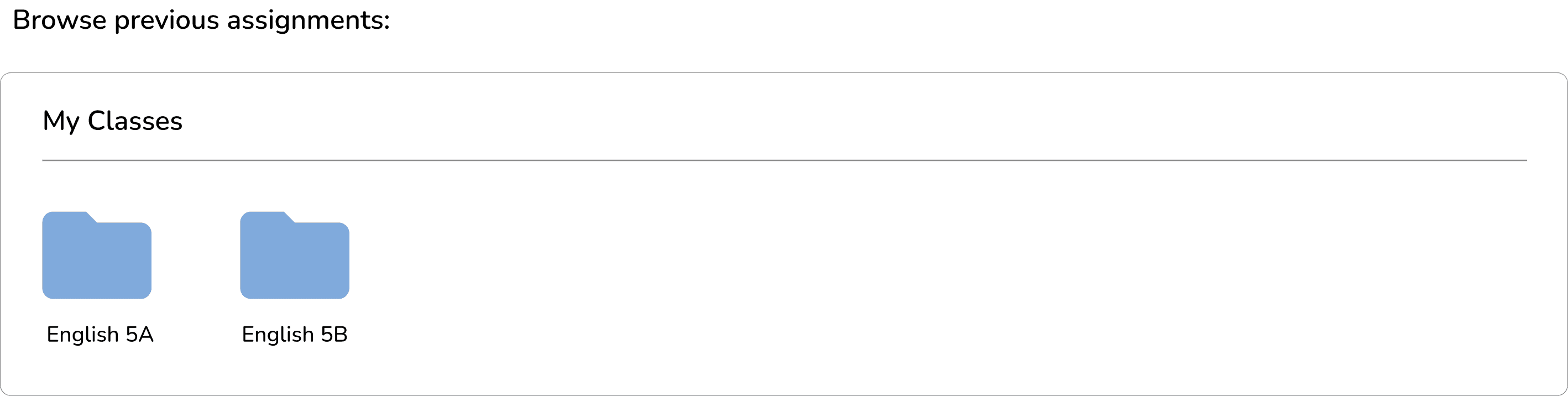
The original teacher homepage listed all assignments in a continuous scroll, which became overwhelming as teachers accumulated more assignments.
To fix this, I redesigned the layout by organizing assignments into folders by class, since many teachers teach multiple sections of the same subject or different subjects. Teachers can now select a class folder to view all related assignments, making navigation clearer and more efficient.
1. Organizing Assignments by Class
The original teacher homepage listed all assignments in a continuous scroll, which became overwhelming as teachers accumulated more assignments.
To fix this, I redesigned the layout by organizing assignments into folders by class, since many teachers teach multiple sections of the same subject or different subjects. Teachers can now select a class folder to view all related assignments, making navigation clearer and more efficient.
1. Organizing Assignments by Class
The original teacher homepage listed all assignments in a continuous scroll, which became overwhelming as teachers accumulated more assignments.
To fix this, I redesigned the layout by organizing assignments into folders by class, since many teachers teach multiple sections of the same subject or different subjects. Teachers can now select a class folder to view all related assignments, making navigation clearer and more efficient.

2. Improving Student Results Display
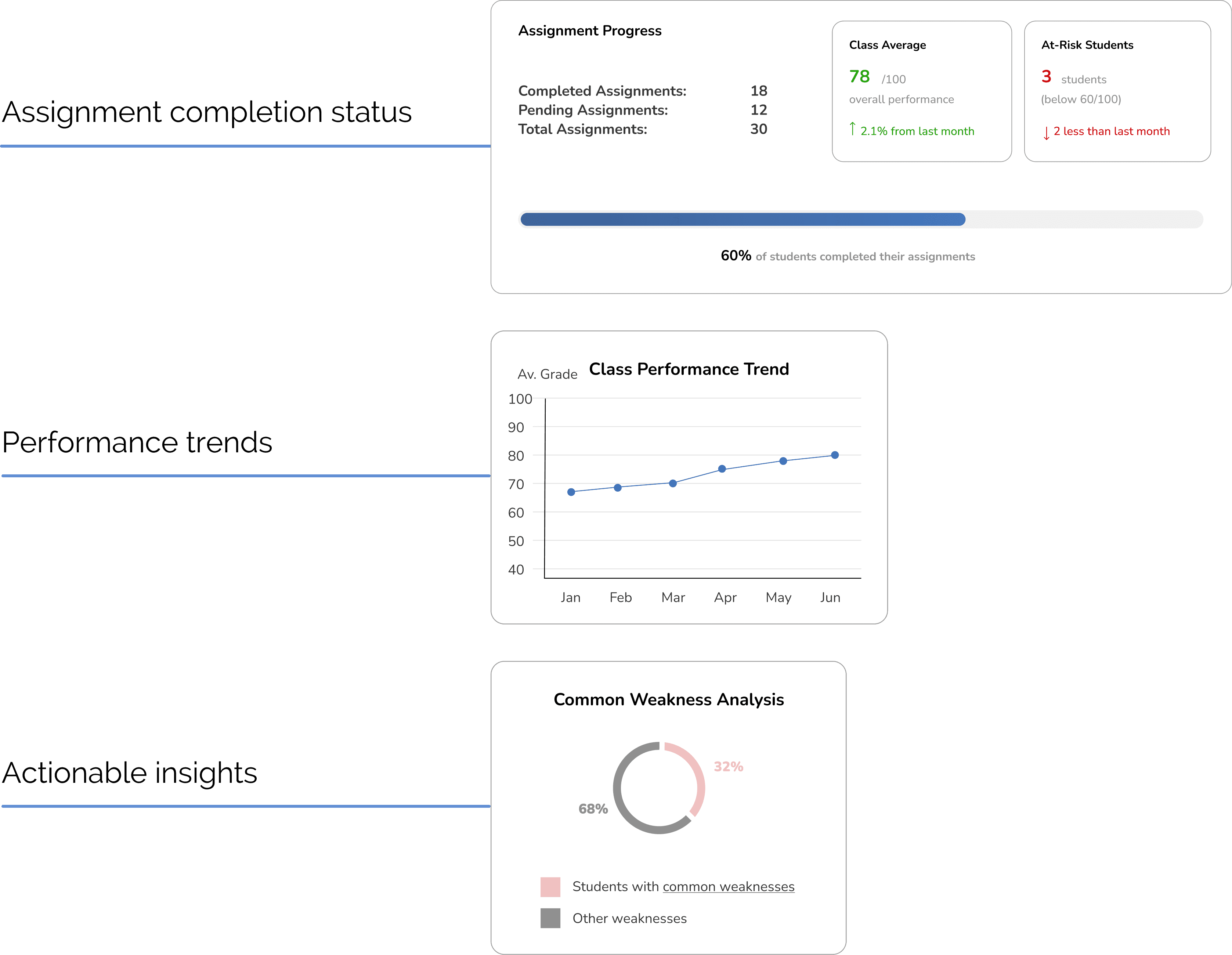
Teachers needed a way to quickly assess student progress. After user testing, I designed an improved dashboard layout that prioritizes:
2. Improving Student Results Display
Teachers needed a way to quickly assess student progress. After user testing, I designed an improved dashboard layout that prioritizes:
2. Improving Student Results Display
Teachers needed a way to quickly assess student progress. After user testing, I designed an improved dashboard layout that prioritizes:
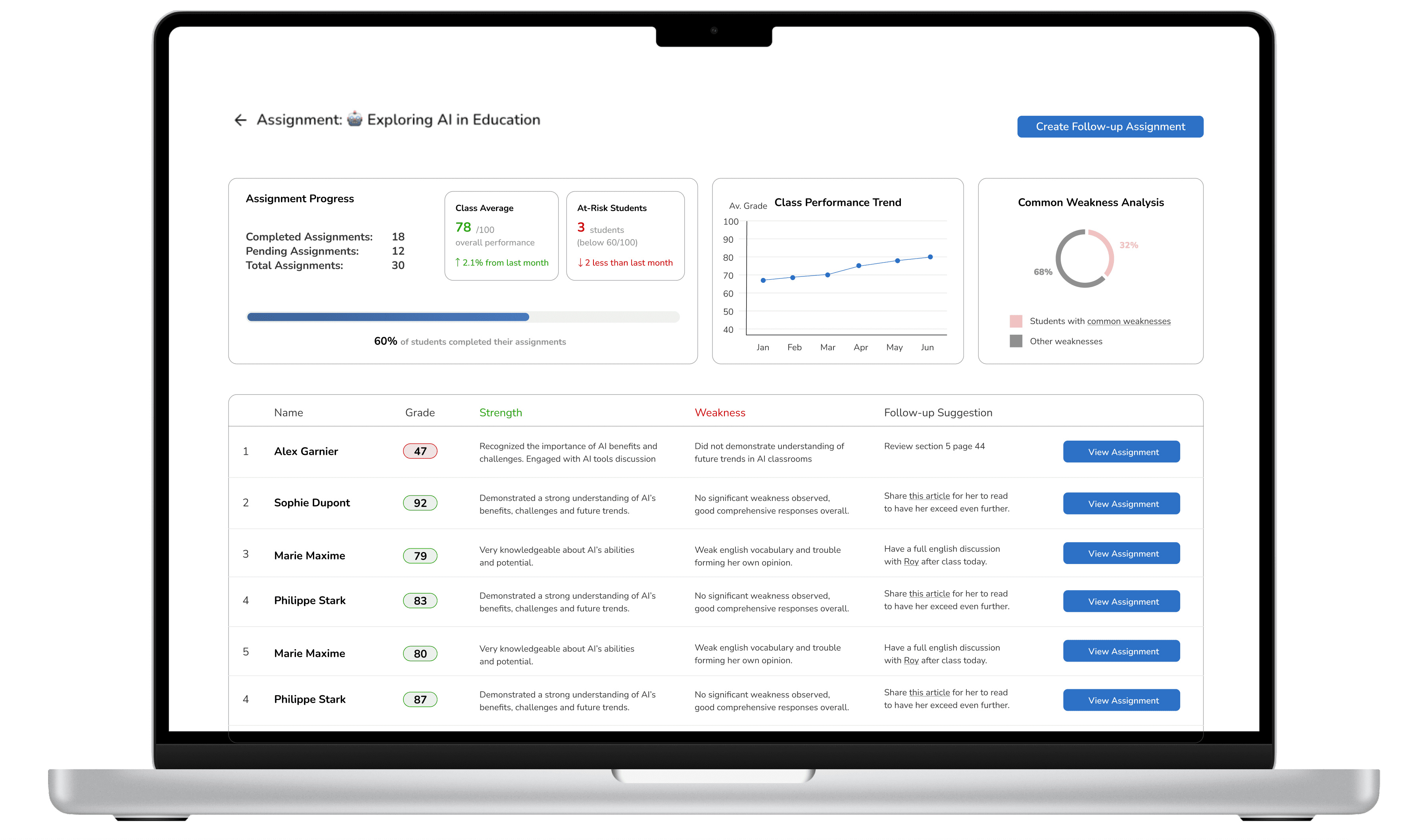
Additionally, one of the unique features Udaress offers is AI-driven follow-up suggestions. For each student, the AI highlights strengths in green and weaknesses in red, with explanations.
This saves teachers time and enhances student support.
Additionally, one of the unique features Udaress offers is AI-driven follow-up suggestions. For each student, the AI highlights strengths in green and weaknesses in red, with explanations.
This saves teachers time and enhances student support.
Additionally, one of the unique features Udaress offers is AI-driven follow-up suggestions. For each student, the AI highlights strengths in green and weaknesses in red, with explanations.
This saves teachers time and enhances student support.
3. Detecting Cheating & Flagging Content
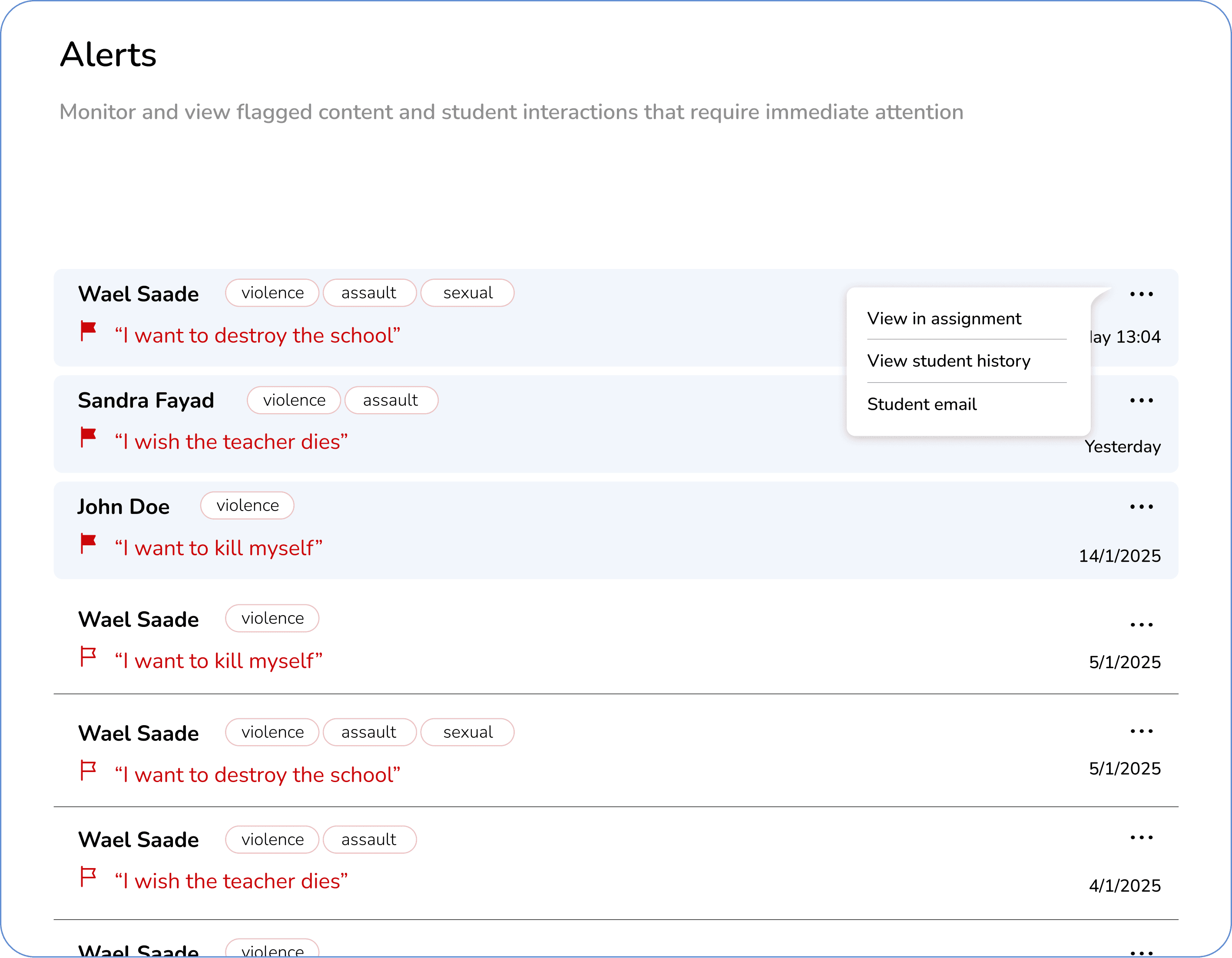
Stakeholders emphasized the importance of giving teachers control over student interactions. The AI detects:
Cheating behavior, such as copying and pasting from external sources.
3. Detecting Cheating & Flagging Content
Stakeholders emphasized the importance of giving teachers control over student interactions. The AI detects:
Cheating behavior, such as copying and pasting from external sources.
3. Detecting Cheating & Flagging Content
Stakeholders emphasized the importance of giving teachers control over student interactions. The AI detects:
Cheating behavior, such as copying and pasting from external sources.
Inappropriate or harmful content in student responses.
To ensure teachers are notified efficiently, I added clear flags and alerts in the assignment results. This allows them to immediately spot any issues.
Inappropriate or harmful content in student responses.
To ensure teachers are notified efficiently, I added clear flags and alerts in the assignment results. This allows them to immediately spot any issues.
Inappropriate or harmful content in student responses.
To ensure teachers are notified efficiently, I added clear flags and alerts in the assignment results. This allows them to immediately spot any issues.
4. The “My Students” Page
Teachers need quick access to student information. I introduced a toggle switch with two views:
4. The “My Students” Page
Teachers need quick access to student information. I introduced a toggle switch with two views:
4. The “My Students” Page
Teachers need quick access to student information. I introduced a toggle switch with two views:
Search by student
Search by student
Search by class
Search by class
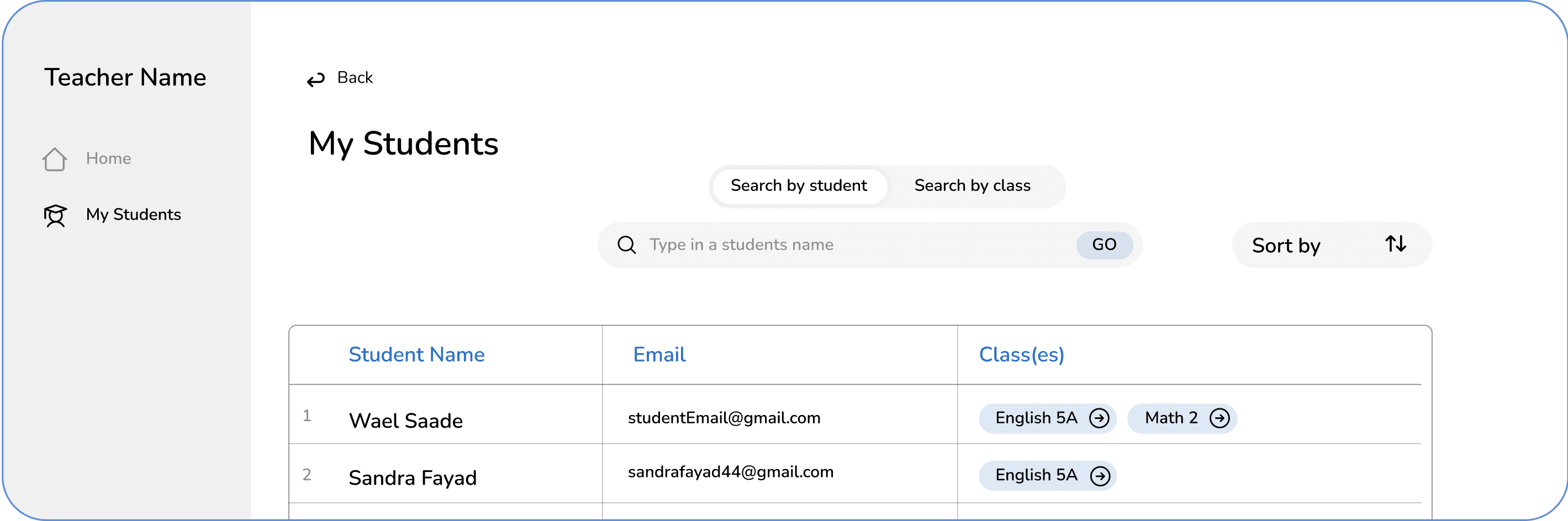
By Student:
Shows every student the teacher instructs, regardless of class
Displays the student’s name, email, and enrolled classes
By Student:
Shows every student the teacher instructs, regardless of class
Displays the student’s name, email, and enrolled classes
By Student:
Shows every student the teacher instructs, regardless of class
Displays the student’s name, email, and enrolled classes
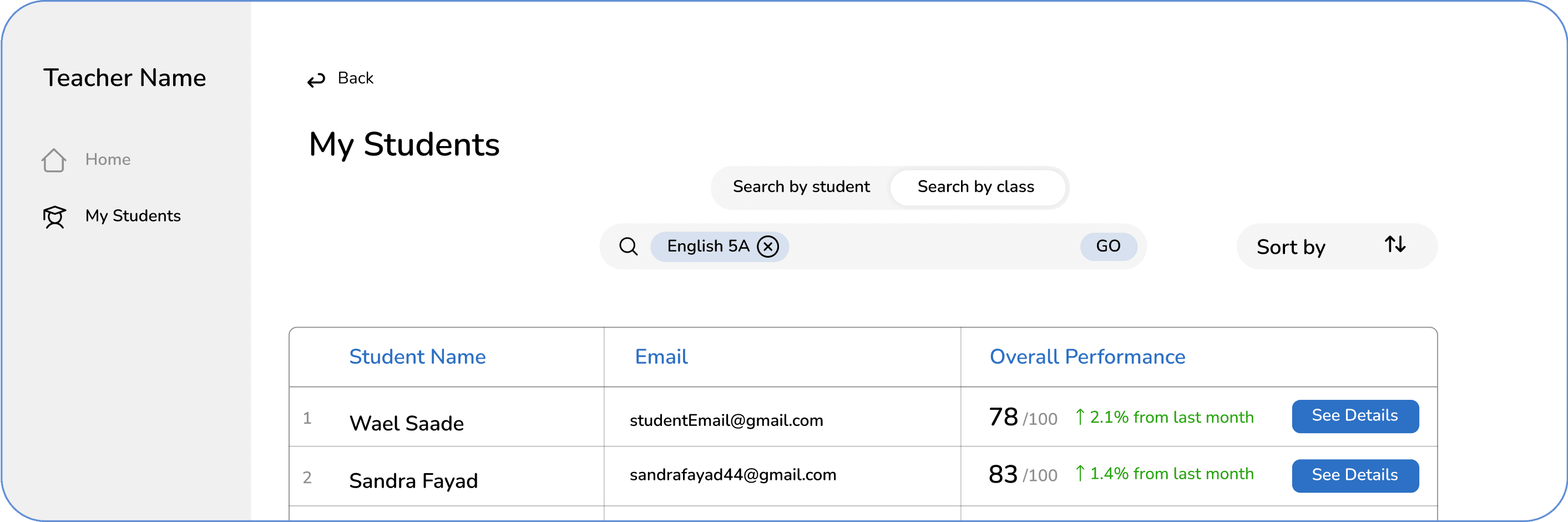
By Class:
Filters the list to show only students from a specific class
Displays each student’s overall performance grade in that class
By Class:
Filters the list to show only students from a specific class
Displays each student’s overall performance grade in that class
By Class:
Filters the list to show only students from a specific class
Displays each student’s overall performance grade in that class
This approach provides essential insights at a glance, while still allowing teachers to dive deeper when clicking to see more details.
This approach provides essential insights at a glance, while still allowing teachers to dive deeper when clicking to see more details.
This approach provides essential insights at a glance, while still allowing teachers to dive deeper when clicking to see more details.
09. BRINGING THE MVP TO LIFE
The final design considered every aspect—from empty states and error handling to micro-interactions and visual hierarchy.
The end result? A more intuitive, efficient, and teacher-friendly platform that truly acts as a teaching assistant rather than just a quiz tool.
The final design considered every aspect—from empty states and error handling to micro-interactions and visual hierarchy.
The end result? A more intuitive, efficient, and teacher-friendly platform that truly acts as a teaching assistant rather than just a quiz tool.
The final design considered every aspect—from empty states and error handling to micro-interactions and visual hierarchy.
The end result? A more intuitive, efficient, and teacher-friendly platform that truly acts as a teaching assistant rather than just a quiz tool.
Enjoyed reading?
Explore more of my work
Explore more of my work
Explore more of my work
Ⓒ 2025 Sandra Fayad. All right reserved.
Ⓒ 2025 Sandra Fayad. All right reserved.
Ⓒ 2025 Sandra Fayad. All right reserved.